The Revenue section in the Management UI allows you to configure developer fees and manage the accounts where those fees are collected. Developer fees enable you to collect additional fees from your end customers when they perform transactions on your platform.
The Revenue section contains two main tabs:
- Revenue Accounts: View and manage the accounts where collected fees are deposited
- Customer Fees: Create, view, update, and delete fee configurations
Developer fees are charges you can apply to customer transactions on your platform. These fees are collected in addition to any network or processing fees and are deposited into your designated revenue accounts.
Each fee configuration consists of two parts:
- Filters: Define WHICH transactions the fee applies to (asset type, trade pair, customer, rail)
- Attributes: Define HOW the fee is charged (fee structure, charge asset type, revenue account, status)
You can configure fees for four different transaction types:
| Fee Type | Description | Applied When |
|---|---|---|
| Exchange | Fees charged when customers trade between different assets | Customer executes a trade or exchange transaction |
| Deposit | Fees charged when customers deposit funds into their accounts | Customer deposits fiat or crypto assets |
| Withdrawal | Fees charged when customers withdraw funds from their accounts | Customer withdraws fiat or crypto assets |
| Transfer | Fees charged when customers transfer funds between accounts | Customer transfers assets between their own accounts or to other customers |
For more information about these transaction types, see the Deposits, Withdrawals, Transfers, and Exchanges guides.
Revenue accounts are the accounts where your collected fees are deposited. Before you can create fee configurations, you must have at least one revenue account set up.
Each revenue account displays the following information:
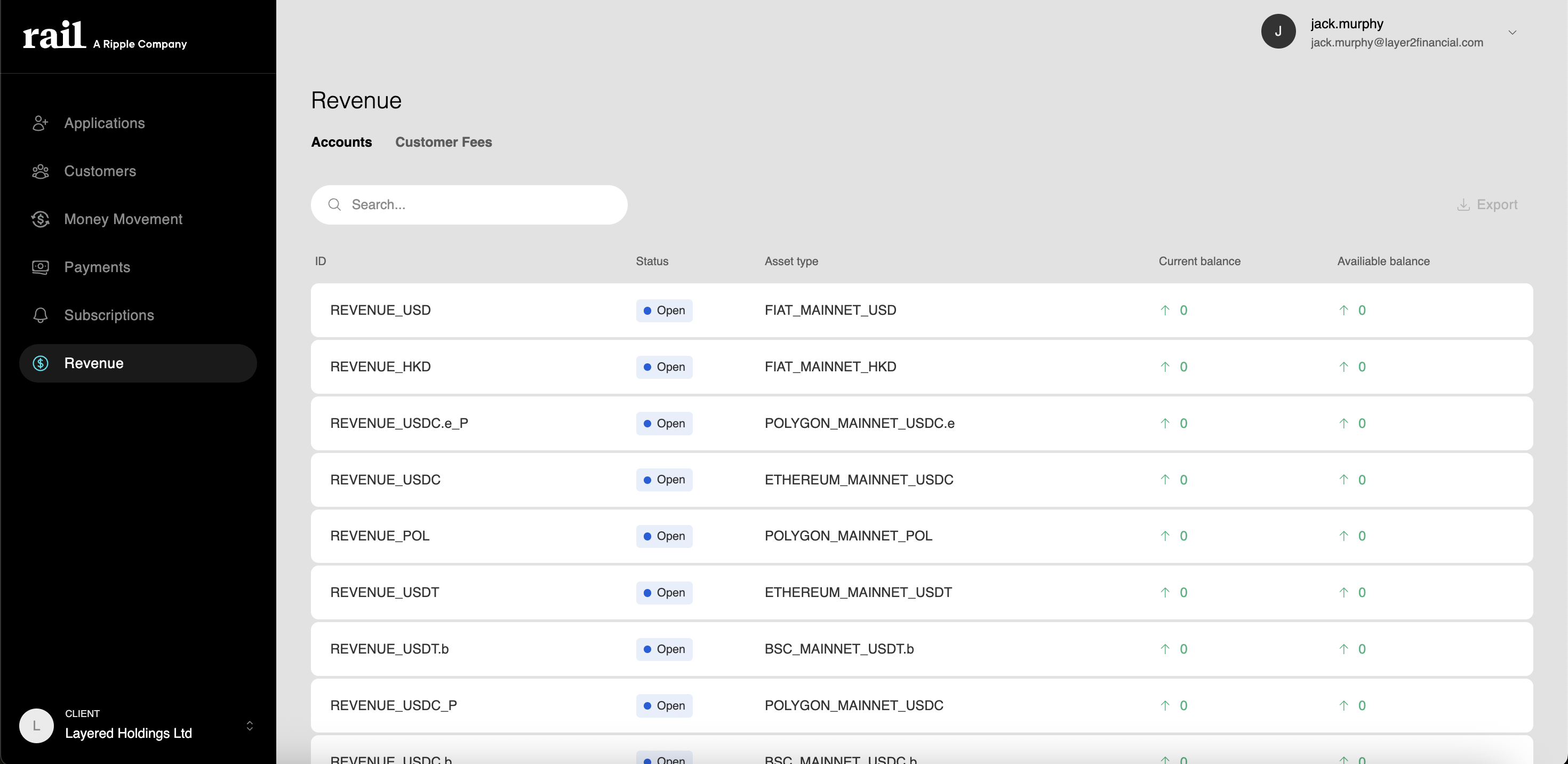
| Field | Description |
|---|---|
| External Id | The name of the account |
| Status | Account status (active, inactive) |
| Asset Type Id | The type of account (e.g., fiat, trading) |
| Asset | The asset held in this account |
| Balances | Current and available balance of collected fees |
The Customer Fees tab is where you create, view, update, and delete fee configurations.
The Customer Fees tab displays all existing fee configurations in a table format:
| Group | Column | Description |
|---|---|---|
| Filter | Fee Type | The transaction type (exchange, deposit, withdrawal, transfer) |
| Filter | Fee Structure | bps (basis points) for percentage-based OR min/max for fixed bounds |
| Attribute | Charge Asset | The asset in which the fee is collected |
| Attribute | Asset Type | The specific asset (if applicable) or "All assets" |
| Attribute | Trade Pair | The specific trade pair for exchange fees (if applicable) |
| Attribute | Customer | The specific customer (if applicable) or "All customers" |
| Attribute | Rail | The specific rail (if applicable) or "All rails" |
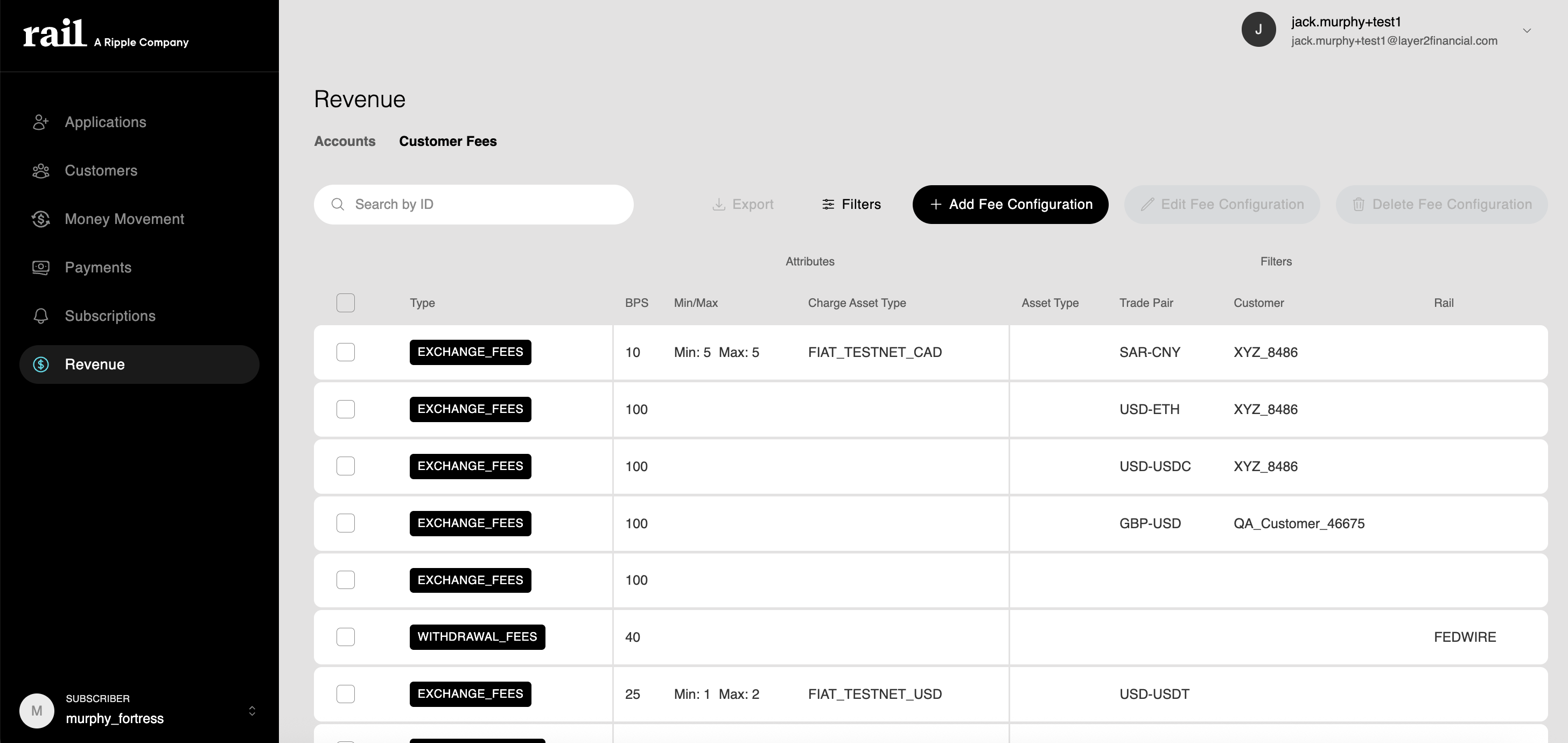
To create a new fee configuration:
- Click the Create Fee Configuration button
- Complete the fee configuration form
- Click Create
When creating a fee configuration, you'll configure filters and attributes:
Filters determine which transactions the fee applies to. Precedence order from most generic to most specific:
| Field | Required | Precedence | Description | Options/Format |
|---|---|---|---|---|
| Fee Type | Yes | N/A | The transaction type to charge fees on | Exchange, Deposit, Withdrawal, Transfer |
| Asset Type | No | 1 (most generic) | Apply this fee only to transactions with a specific asset | Leave blank for all assets, or select a specific asset (e.g., BTC, ETH, USD) |
| Trade Pair | No | 2 | For exchange fees: the specific trading pair | Source and destination trade assets (e.g., BTC → USD) Applicable to: Exchange only |
| Customer | No | 3 | Apply this fee only to a specific customer | Leave blank for all customers, or select a specific customer |
| Rail | No | 4 (most specific) | Apply this fee only to transactions using a specific rail | Leave blank for all rails, or select a specific rail (e.g., ACH, Wire, Bitcoin Network) Applicable to: Deposit, Withdrawal |
Attributes define how the fee is calculated and where it is collected:
| Field | Required | Description | Options/Format |
|---|---|---|---|
| Fee Structure | Yes | How the fee is calculated - either bps OR min/max | bps: Basis points (100 bps = 1%, e.g., 10 bps = 0.1%) min: Minimum fee amount max: Maximum fee amount Note: Use either bps (percentage) OR min/max (fixed bounds), not both |
| Charge Asset Type | Yes | The asset in which the fee is collected | Select the asset for fee collection (e.g., USD, BTC) |
To update an existing fee configuration:
- Click on the fee configuration you want to edit
- Modify the fields you want to change
- Click Update
You can update most fields including the fee amount, status, and targeting parameters. However, changing the fee type requires creating a new configuration.
To delete a fee configuration:
- Click on the fee configuration you want to delete
- Click the Delete button
- Confirm the deletion
Warning: Deleting a fee configuration is permanent and cannot be undone. The fee will no longer be applied to future transactions immediately after deletion.
Here are some common fee configuration scenarios demonstrating both bps (percentage-based) and min/max (fixed bounds) structures:
| Scenario | Fee Type | Filters Asset / Trade Pair / Customer / Rail | Attributes Fee Structure / Charge Asset | Precedence Level |
|---|---|---|---|---|
| Standard Exchange Fee | Exchange | All assets | bps: 100 (1%) Charge asset: USD | Generic (no filters) |
| Premium Customer Rate | Exchange | All assets / - / Premium_Customer_123 / - | bps: 50 (0.5%) Charge asset: USD | Customer-specific (precedence 3) |
| BTC Deposit Fee | Deposit | BTC / - / - / Bitcoin Network | min: 0.0001 BTC max: 0.001 BTC Charge asset: BTC | Rail-specific (precedence 4 - most specific) |
| ACH Withdrawal Fee | Withdrawal | USD / - / - / ACH | min: 5.00 USD max: 25.00 USD Charge asset: USD | Rail-specific (precedence 4 - most specific) |
| Free Transfer Program | Transfer | All assets | bps: 0 Charge asset: USD | Generic (no filters) |
| BTC/USD Trading Fee | Exchange |
| bps: 75 (0.75%) Charge asset: USD | Trade pair-specific (precedence 2) |
| ETH Asset Fee | Exchange | ETH | bps: 150 (1.5%) Charge asset: ETH | Asset-specific (precedence 1) |
Key Points:
- bps examples show percentage-based fees (100 bps = 1%)
- min/max examples show fixed amount bounds
- Precedence determines which fee applies when multiple match (Rail > Customer > Trade Pair > Asset Type)
- Charge asset type specifies what asset the fee is collected in
- Revenue Account must match the charge asset type
Once a fee configuration is active, fees are automatically calculated and applied when customers complete matching transactions. The fee is deducted from the transaction amount and deposited into the designated revenue account.
When multiple fee configurations could apply to a single transaction, the system uses the filter with the highest specificity. The precedence order from most generic to most specific:
- Asset type (most generic) - Applies to all transactions with a specific asset
- Trade pair - Applies to exchange transactions with specific source and destination assets
- Customer - Applies to transactions by a specific customer
- Rail (most specific) - Applies to deposit/withdrawal transactions using a specific payment rail
When multiple filters match a transaction, the most specific matching filter wins.
Begin with generic fee configurations that apply to all customers or all transactions of a type. As your business grows, add specific configurations for premium customers, high-value assets, or special circumstances.
Be transparent with your customers about the fees you charge. Clearly communicate fee structures in your customer agreements and user interfaces. For guidance on fee disclosure requirements, see the Consumer Protection Guide.
Periodically review your fee configurations to ensure they align with your business model and remain competitive. Monitor revenue collection to understand which fee types generate the most revenue and which customers or transaction types are most active.
When creating new fee configurations, consider starting with inactive status or testing with a small group of customers before rolling out broadly. This allows you to verify the configuration works as expected before it impacts all customers.