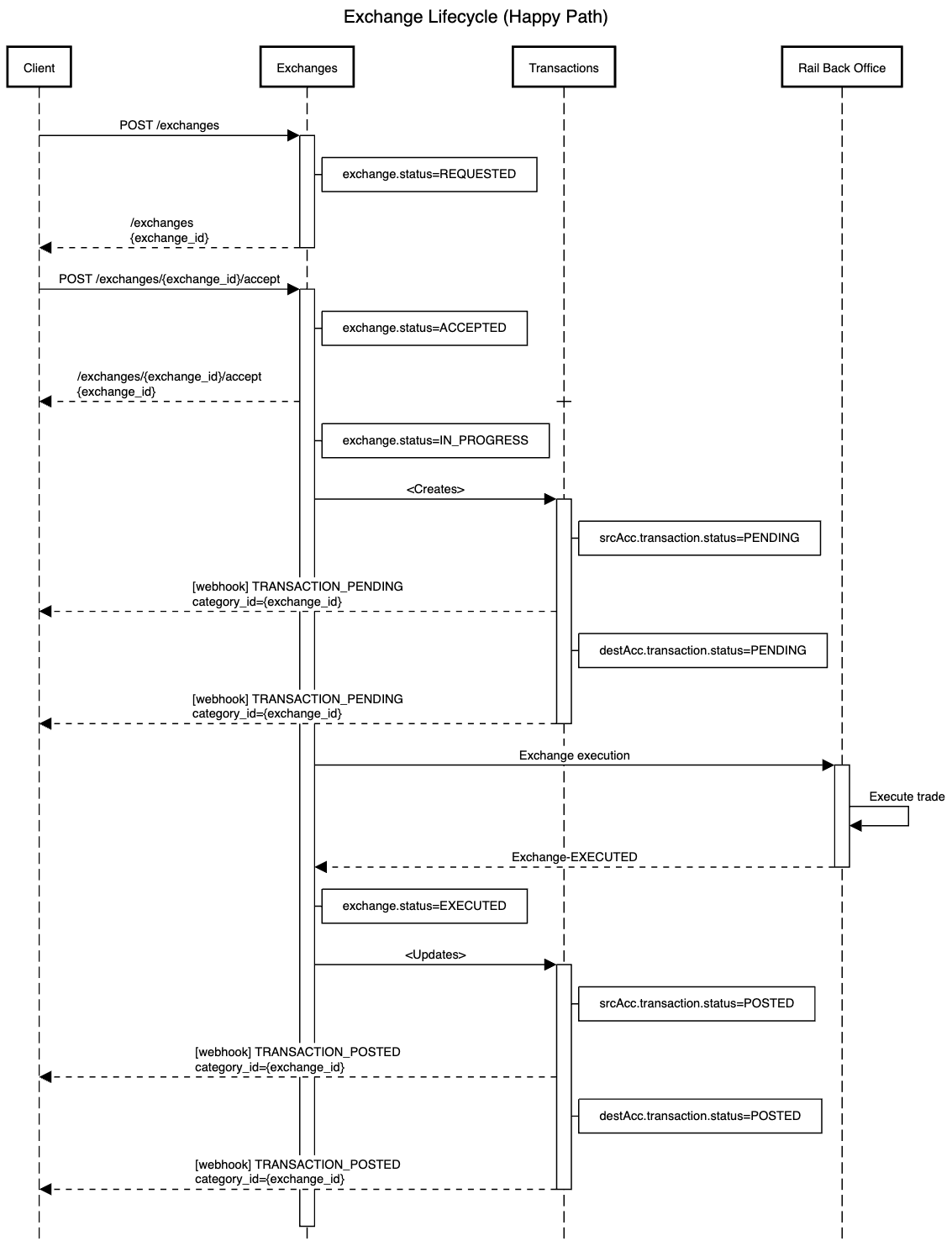
Currency trades (exchanges) are performed by moving assets from one account to another. At present - one side of every exchange must be a stable coin. Click here to see the full list of supported exchange pairs.
There are 2 steps to performing an exchange:
- Create the exchange - to create and preview the exchange and get an indicative exchange price. (Create Market Exchange)
- Accept the exchange - to confirm exchange and begin processing the trade. (Accept Exchange)
To retrieve details and status of an exchange use the Retrieve Exchange endpoint with the relevant exchange id.
Currently, perform a fiat-to-fiat exchange would require 2 separate exchanges.
Currently, Rail supports MARKET and OTC trades.
With a market trades, the trade will get executed at the market price which may be different to the price quoted to the customer. Market trades are placed using the Create Market Exchange API.
With an OTC trades, the trade will get executed at the price quoted to the customer. OTC trades are placed can be placed by raising a ticket at support.rail.io.
The action field is use to denote which account has a fixed amount.
Setting action to FIX_SOURCE fixes the amount you want to debit from the SOURCE account. Therefore the quote provided is for how much would be credited to the DESTINATION account. Think of this as 'selling' the source amount.
Setting action to FIX_DESTINATION fixes the amount to credit to the DESTINATION account. Therefore the quote provided is for how much to deduct from the SOURCE account. Think of this as 'buying' the destination amount. When accepting FIX_DESTINATION trades slippage is used to ensure the trade gets executed.
Market exchanges with action is FIX_DESTINATION use slippage to ensure that trades placed with Rail get executed. Slippage protects customers from large market fluctuations, given that at times there may be time between a trade being quoted (at price A) and a trade being executed (at price B). Slippage is the basis points (bps) amount the customer is willing to accept in percentage change in value between price A and price B.
The default value for maximum_slippage in the Accept Exchange API is 100 bps. This means that the customer is willing the accept in percentage change in value between price A and price B equal to 1% / 100 basis points. If the actual percentage difference between A and B is greater than 100 bps, the trade will be cancelled. If the actual percentage difference between A and B is less than or equal to 100 bps, the trade will be executed at price B.
After execution, the unused portion of the 100 bps buffer is credited back to the SOURCE account as a MARKET_ADJUSTMENT transaction.
Note - Slippage is only relevant on MARKET exchanges where action is FIX_DESTINATION.
You can set your own slippage on Accept Exchange requests by updating to exchanges be updating the maximum_slippage value . This will override the default 100 basis points (bps) to respect the value provided as slippage.
Note:
- Low slippage - Setting slippage to a low value means less funds are required in the source account to create an exchange, minimizing trade exposure. It also means that the exchange is more likely to get
REJECTED, especially when there is market volatility. - High slippage - Setting slippage to a high value means more funds are required in the source account to create an exchange, maximizing trade exposure. It also means that the exchange is more likely to get
EXECUTED, especially when there is market volatility.
If an Exchange gets REJECTED try increasing the maximum_slippage value and retrying the Create and Accept requests.
Scenario where the exchange lifecycle executes without issues.